SFM compile is a term that confuses many new Source Filmmaker users. You may have seen it in a tutorial, a forum post or a file name and wondered what it actually does. Some websites treat it like a single program, while others treat it like a skill. That mix makes the topic harder than it needs to be.
This article explains what SFM compile means, which tools are involved and how the process works from start to finish. It also covers the other ways people use the phrase and the mistakes that cause most failures. By the end, you will know what to do when a custom model refuses to show up in SFM.
What Is SFM Compile?
SFM compile is the process of converting a finished 3D model, with its textures, skeleton and animation data, into a format that Source Filmmaker and the Source Engine can load. SFM stands for Source Filmmaker, the animation tool built on Valve’s Source engine. Compiling is the step that turns your raw files into a working model.
Most guides describe it as a workflow, not one app. In practice, a compiler called StudioMDL does the real work, and a tool such as Crowbar gives it a friendly window. If someone mentions SFM compile in a modding or animation setting, they almost always mean this process.
SFM Compile Meanings at a Glance
The phrase changes slightly with context. This table shows the common uses. The examples are illustrations, not quotes from real posts.
| Context | Possible meaning | Example | How to tell |
|---|---|---|---|
| Model making | Turning model files into a usable MDL | “My SFM compile failed.” | The post mentions QC, SMD or Crowbar |
| Tutorial or guide | The full compile workflow | “Learn SFM compile in 10 steps.” | Steps cover export, QC and testing |
| Map making | Building a map file for SFM | “Compile the map in Hammer.” | The post mentions VMF or BSP files |
| Video sharing | A collection of SFM clips | “Best SFM compile of the year.” | The post links to a video, not a tool |
| Website name | A site that uses the phrase as a brand | “Visit the SFM compile site.” | The text points to a web address |
The table shows that the technical meaning is the best supported one. The video meaning is a possible use that no official source defines, so treat it as context dependent.
What Does SFM Compile Mean in Source Filmmaker?
The word compile comes from programming. A compiler takes human friendly files and turns them into a form a machine can use. SFM compile follows the same idea for 3D art. You build in tools made for people, and the compiler converts the result for the engine.
Why SFM Cannot Use Raw Model Files
Source Filmmaker does not read standard 3D files such as .blend, .fbx or .obj directly. It needs a compiled model built for the Source Engine. Compiling is the bridge between a model that exists on your computer and a model that works inside SFM.
Think of it like baking. Your Blender or Maya file is the raw dough. The compiler is the oven, and the finished MDL file is the bread that SFM can serve. You cannot skip the oven, however good the dough looks.
SFM Compile Is a Process, Not One App
Several websites call SFM Compile a program. The sources reviewed for this article, which include Valve’s community documentation and the Crowbar guides, do not show a single official app with that name. They describe a workflow built from a few separate tools.
That difference matters when you search for a download. If a page offers an SFM Compile installer, check what it really contains before you run it. The safe path is to use the tools that Valve and the modding community document.
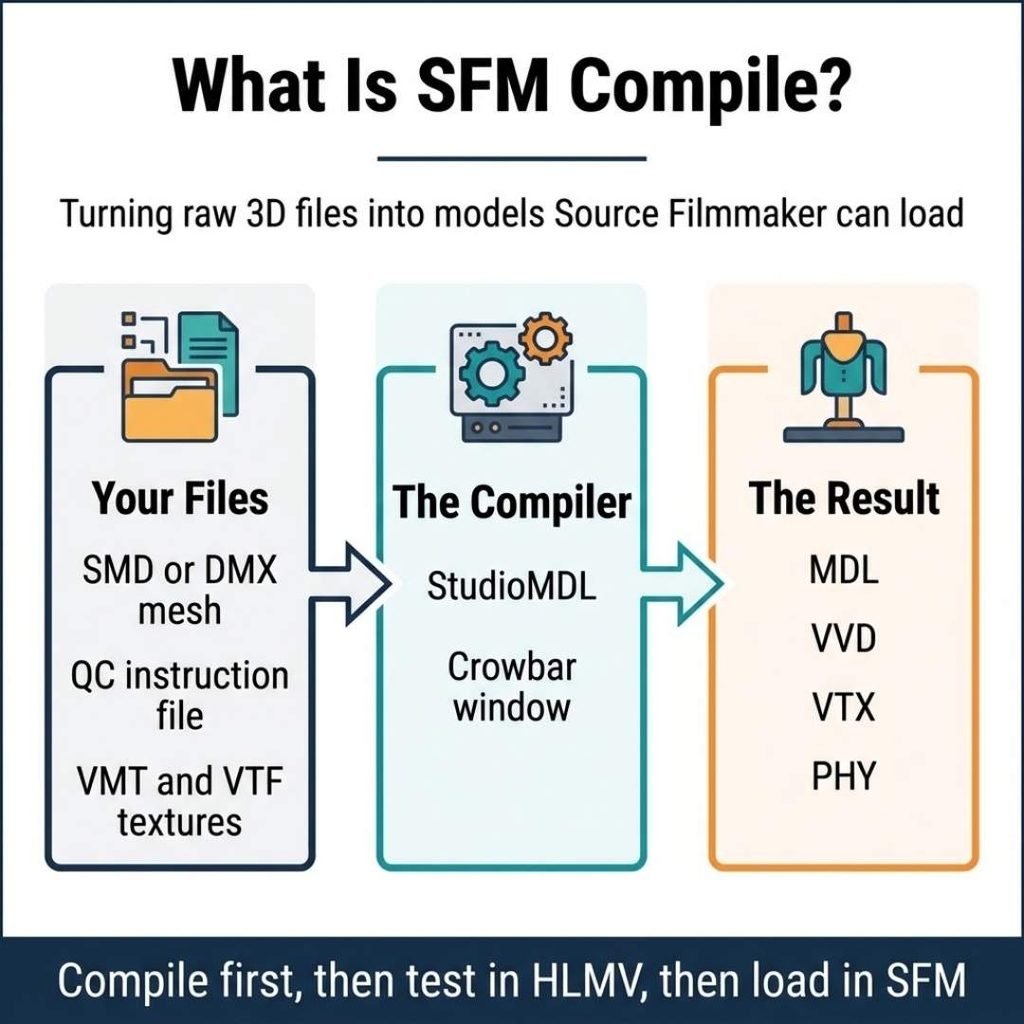
The Files Involved in an SFM Compile
Understanding the file types makes the whole process less scary. Each file has one job, and the compiler needs all of them to agree.
Source Files: SMD and DMX
SMD and DMX files hold your geometry, bones and animation data. You usually export them from your 3D program with a plugin such as Blender Source Tools. SMD is the older format and DMX is the modern one for models and animations. Pick one and stay consistent inside a single project so the QC file stays simple.
The QC File
The QC file is the instruction sheet. According to the Valve Developer Community, a QC file is a script that controls the process of compiling SMDs into a binary model that a game can load. You can read more on the Valve Developer Community’s QC page.
The QC file tells the compiler three main things. It names the finished model, points to the mesh and animation files and lists the folder where the textures live. Common commands include $modelname for the output name, $body for the mesh, $cdmaterials for the texture folder and $sequence for each animation.
A wrong path in this file is a very common reason a compile fails. The same Valve page notes that shared QC files meant for $include usually get the extension qci. You may see these in larger projects.
The Compiled Output
A successful compile creates several files. These include MDL, VVD and VTX files, plus a PHY file when physics are involved. You need all of them together for the model to load.
Textures are separate. Skin data lives under the materials folder as VMT and VTF files. The compiler does not create these for you. You must prepare them and place them where the QC file expects them.
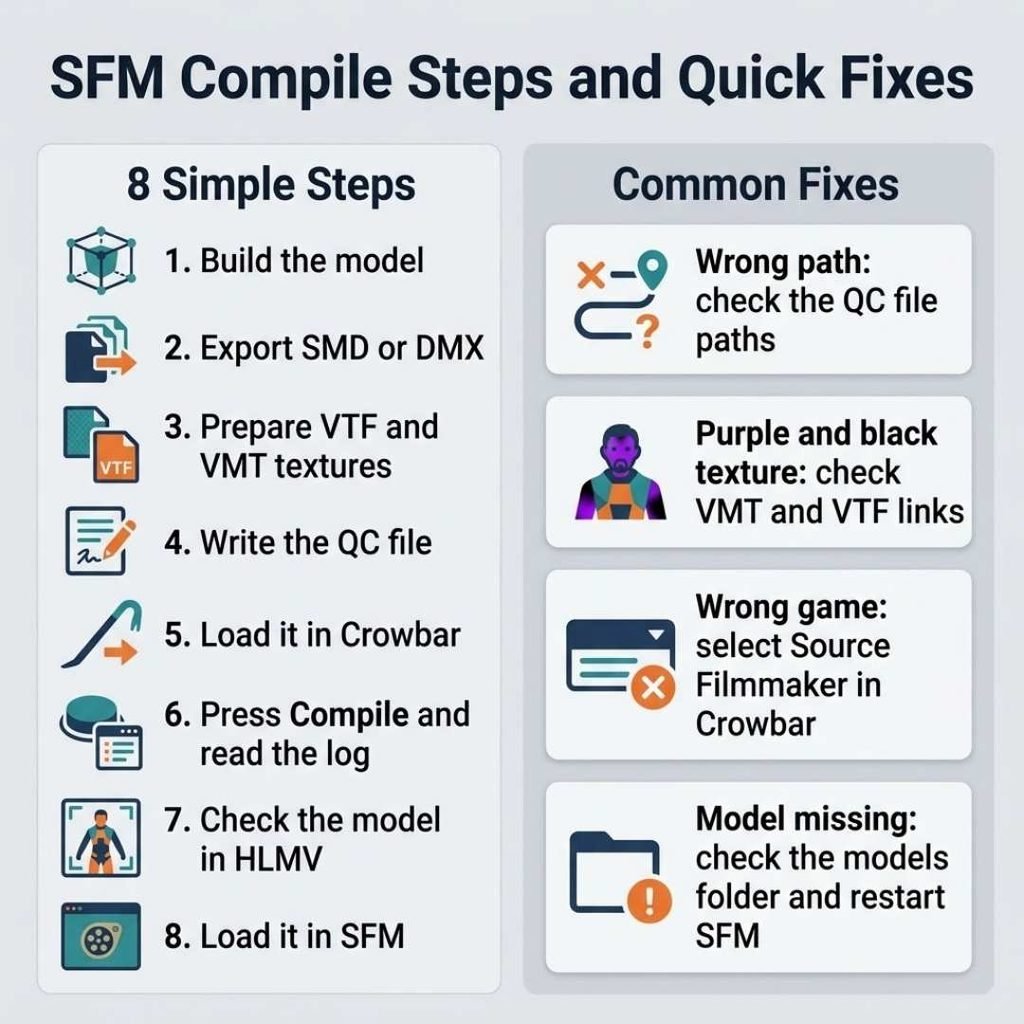
Tools Used for SFM Compile
You do not need many programs. A small toolkit covers nearly every case.
StudioMDL
StudioMDL is the compiler itself. It is a command line tool that ships with Source games and SDKs. A community thread about Source Filmmaker lists it inside the SFM game folder, in a bin directory next to the model viewer and Hammer.
Because it runs from a command prompt, many beginners find it unfriendly. That is why most people pair it with Crowbar. You can still run it by hand if you like typing commands, and the Valve troubleshooting page shows how.
Crowbar
Crowbar is a community tool made by ZeqMacaw. It can decompile and compile Source models and view them. A popular Steam guide to Crowbar notes that Crowbar does not do the actual compiling, since it calls a game’s studiomdl.exe tool to compile. You can read the guide on Steam Community.
In plain words, Crowbar is the steering wheel and StudioMDL is the engine. You pick a QC file, choose the Source Filmmaker game setting and press compile. The large text box shows a log with progress and errors.
Half-Life Model Viewer
The Half-Life Model Viewer, often called HLMV, lets you check a model before you load it into SFM. Guides recommend testing in HLMV before loading anything into SFM. It saves time because problems show up early.
Blender Source Tools
This plugin lets Blender export SMD and DMX files. Other 3D programs have similar plugins. Without one, you have no easy way to create the source files that the compiler needs.
Hammer for Maps
Hammer is the Source map editor. It also sits in the SFM tools folder, so map makers can reach it from the same install.
How to Compile a Model for SFM Step by Step
The exact buttons vary by version, but the order stays the same. Follow these steps as a simple path.
- Build or edit your model in a 3D program.
- Export the mesh, skeleton and animations as SMD or DMX files.
- Prepare your textures as VTF and VMT files.
- Write a QC file with correct names and folder paths.
- Open Crowbar, pick the Source Filmmaker setting and load your QC file.
- Press Compile and read the log.
- Open the result in HLMV to check it.
- Load the model in SFM.
Keep the folder names short and simple. One guide warns that even a single mistyped folder name will break the compile. Avoid spaces and odd characters when you can.
Pay attention to where the model will land. The model name in the QC file sets the output path, and the compiler writes the finished model under the models folder of the game you selected. Crowbar’s game setting decides which folder that is.
Run the compile again after each fix. Do not change five things at once. A good habit is to compile the model, load it in SFM, find the first problem, fix only that problem and compile again.
Finally, load the model inside SFM and test it with a pose. Move a few bones and watch the mesh bend. If a leg stretches or a face collapses, the problem is usually in the weights or the bone setup, not in the compile itself.
Can You Compile Maps and Animations Too?
Models are the main use, but they are not the only one. Some guides also describe compiling maps. In that case, you build a map in Hammer and compile it from a VMF file into a BSP file.
Animations work differently. In many cases, you export an animation as a DMX or SMD file and include it through the QC file as a sequence. Check the tool guide for your version before you rely on a shortcut, since formats and options change between engine branches.
One modding guide explains that engine branches matter. For example, a CS:GO setup cannot decompile TF2 models because of different Source engine branches. Always match the game setting to your target.
Common SFM Compile Problems and Fixes
Compile errors look scary, but they usually have simple causes. Read the log first. It tells you which line or file caused the trouble.
Wrong or Missing Paths
The Valve Developer Community’s troubleshooting page says a broken compile often means the QC file is not written correctly. The fix is to specify all the paths to your model’s source files. Check each name for spelling and folder location.
Missing Textures
If your model shows up as a purple and black checker pattern, the compile may have worked but the materials are wrong. Check that your VMT files point to the right VTF files. Also confirm the folder listed in the QC file matches where you saved them.
Wrong Game Setting
Crowbar needs the right game selected. A model compiled for another Source game may not behave in SFM. Pick the Source Filmmaker option and double check the library path to your Steam folder.
Models That Will Not Load in SFM
If the compile finishes but SFM cannot find the model, look at the output folder. The model must sit in the correct models folder inside the SFM game directory. After moving files, restart SFM so it can see the new files.
Errors From Old QC Files
Old QC files may fail on newer compilers. The Valve Developer Community notes syntax changes for Source models, such as replacing $cdtexture with $cdmaterials. If you reuse an old QC file, update those commands first.
Decompiled Models That Will Not Rebuild
If a decompiled model fails to recompile, do not blame Crowbar. A Steam community reply explains that Crowbar only acts as an interface for StudioMDL. The same reply adds that decompiling is an imperfect science, so some features can be lost.
Other Things People Mean by SFM Compile
Not every use of the phrase is technical. Some of these meanings are possibilities rather than confirmed definitions, so context matters.
Compilation videos. Many creators upload collections of short animations. People may call these an SFM compile, short for compilation. This article found no official source that defines this use, so it depends on where you see it. Some Source Filmmaker videos are made for adult audiences, so check age notes before you click.
Brand or site names. A few websites use SFM Compile in their name and promise guides or downloads. Judge each site by what it shows. A clear tutorial that names the tools and the steps is more useful than a page with big claims.
Other SFM meanings. The letters SFM also appear in other fields. In one GitHub project, SFM stands for Social Feed Manager, which harvests social media data. A code project named sfml-compile relates to a different library called SFML. If your results look like programming for games or data, you may have landed on the wrong topic.
Always read the nearby words. Terms like QC, MDL, Crowbar, VMT and Hammer point to the Source Filmmaker meaning.
How to Stay Safe When You Search for SFM Compile
Because the phrase is also a site name, searches can lead to pages that promise easy downloads. Stay careful and slow down before you click.
Stick to documented tools. Crowbar has a community page on Steam, and the Source SDK tools come through Steam. Be wary of any file that claims to be an all in one SFM Compile installer. Scan downloads, read comments and avoid pages that ask you to turn off your security software.
A good tutorial site names the tools, shows the steps and explains the files. If a page only repeats the keyword and links to downloads, look elsewhere.
Tips for a Smoother SFM Compile
A few habits prevent most headaches. They cost little and save hours.
- Keep a clean folder for each model.
- Use short lowercase names with no spaces.
- Save a backup of the QC file before you edit it.
- Test every new model in HLMV first.
- Read the whole compile log, not just the last line.
Learn from working examples too. Decompiling a simple model with Crowbar shows you a real QC file. Keep in mind that a decompiled QC file may need fixes before it compiles again.
Finally, respect the work of other creators. If you decompile a model made by someone else, check the creator’s rules before you share or change it.
FAQs About SFM Compile
What does SFM compile mean?
It means converting raw 3D model files into a Source Engine format, such as MDL, so Source Filmmaker can load them.
Which tool should beginners use to compile SFM models?
Most beginners use Crowbar. It gives StudioMDL a simple window and shows a compile log that helps you find errors.
Why does my SFM compile fail?
Wrong file paths in the QC file are a common cause. Read the log, fix the first error and compile again.
Do I need to compile every custom model?
Yes. SFM needs each custom asset compiled, and the step repeats for every new model or prop you add.
Conclusion
SFM compile is the step that makes custom models usable in Source Filmmaker. You export your files, write a QC file, run StudioMDL through Crowbar and test the result in HLMV. Each part has a clear job, and small mistakes in paths cause many failures.
Remember that the surrounding message decides the meaning. In a modding thread, it means the compile process. On a video page, it may mean a collection of clips.
Pingback: SDIYBT Meaning: What It Stands For and How People Use It - Centowise
Pingback: Upon or Apon: Which Spelling Is Correct in Modern English? - Centowise
Pingback: Cutesy or Cutsie: Which Spelling Is Correct in Writing? - Centowise